 EffortlessShot
Photo work instructions
Published 2026-08-23 · Updated 2026-09-15
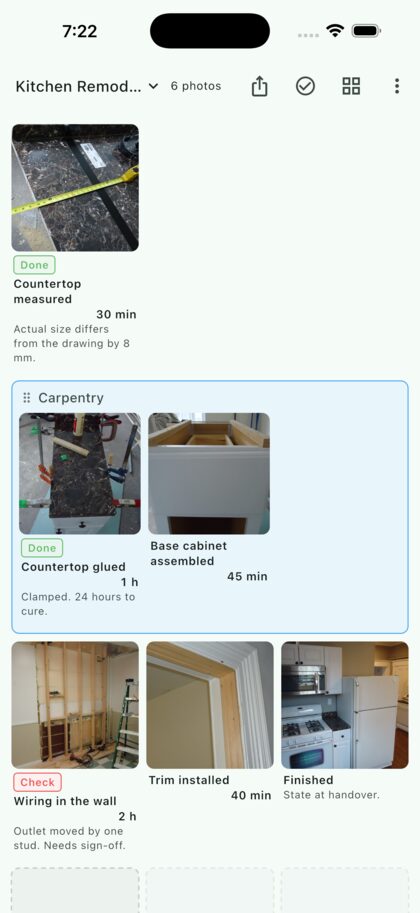
Write-ups get postponed because they are written afterwards, from memory. Shoot one photo per step while you work and the guide is nearly finished by the time you put your tools down. All that's left is naming the steps and sending the PDF.
Why text-only instructions don't stick
"Tack it in place, then tighten" doesn't say which way round it goes or where to hold it. The reader ends up asking anyway, and the writer knows it, which is why the document never gets written.
A photo removes that round trip. It matters most when:
- someone else will do the same job — a handover, a stand-in, a subcontractor
- the job comes round twice a year, so you have forgotten it too
- you have to show what was done afterwards — site records, inspections
- orientation, sequence or feel is hard to put into words
Step by step
1. Shoot one step at a time, while you work
Tapping an empty slot opens the camera and the photo lands in that slot. Shots stay in the order you took them, so you can get straight back to work. Turn on continuous capture and the camera reopens on the next slot after every shot — which matters when your hands are dirty.
2. Name the step, note the time
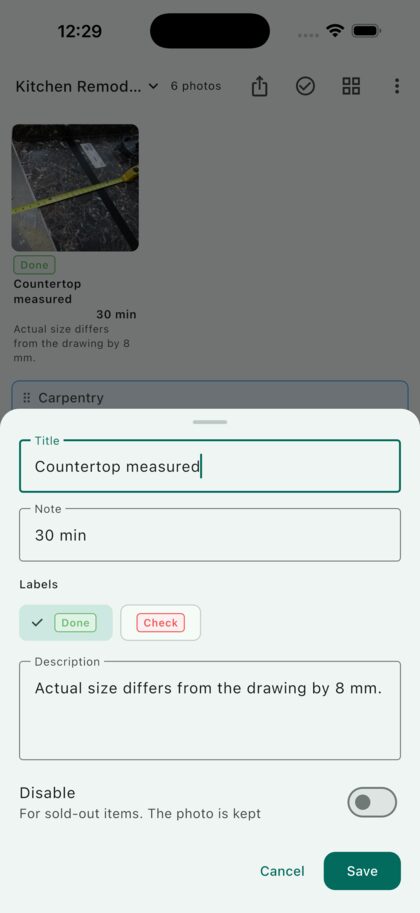
Tap a photo to write a title, a note and a description. Put the step name in the title and the time it took, or the drying time, in the note — it sits right under the photo. Keep the description to one line: the thing you only noticed on site, like "drawing is 6 mm off the real opening".
Labels such as "Done", "Check" or "Rework" can be attached too. You name them yourself, so the words your crew already uses will do.
3. Group the stages
Consecutive photos can be pulled into a named group — prep, install, finish. Each group gets a frame, so even fifty photos stay readable as stages rather than a pile.
4. Slot in the step you missed
Shoot it later and long-press to drop it into place. There are no numbers to renumber. The order lives in the layout, so inserting one photo just shifts the rest along.
Screenshots taken during the job — a settings screen, a drawing, an instruction in an email — go in the same way, side by side with the photos.
5. Hand it over as a PDF
The share button lays the board out as a PDF exactly as you see it. Print it and leave it on site, or mail it. The person receiving it doesn't need the app.
Questions
How many photos fit?
There is no set limit; it is built to hold hundreds. For long jobs, splitting the stages across folders makes them easier to find later.
What if the job runs over several days?
Just keep going. The layout stays when you close the app, so open the same folder the next day and shoot into the next slot.
Can I reorder the photos?
Yes. Long-press one and drop it where it belongs. Whole groups can be moved as one.
Can I control how it prints?
Switch between 2 and 5 columns and the PDF follows what you see. Two columns to show detail, four or five when the overview matters more.
Is it free?
Yes. You get two folders. A one-time Premium purchase lifts the folder limit. On Android, the free version also shows one banner ad, which Premium removes. It is not a subscription.