 EffortlessShot
How to make a photo menu
Published 2026-08-22 · Updated 2026-09-15
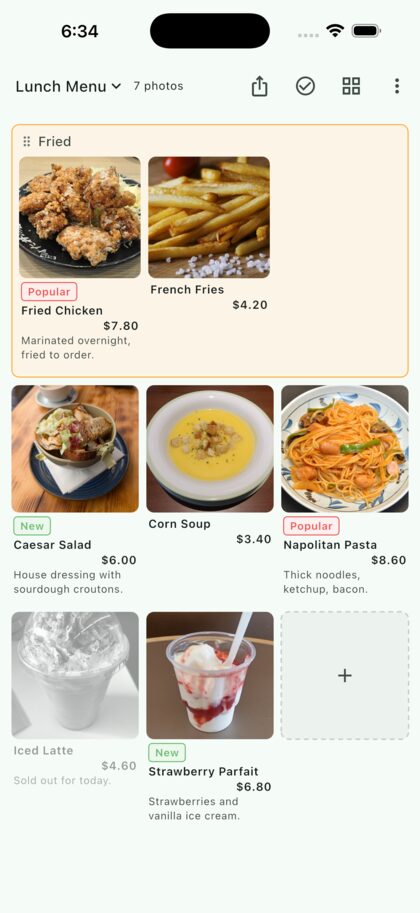
Shoot each dish, put the photos in order, and write a name and a price under each one. No computer and no design work. What you get can be turned into a PDF — print it, or send it to someone before they order.
When photos beat words
A text-only list asks the reader to imagine the dish first. A photo removes that step. It matters most when:
- the menu changes daily or weekly, so it is rebuilt often
- you serve people you don't share a language with — they can point
- you want to send a takeout list before the order comes in
- printing a designed menu isn't worth the money
Step by step
1. Tap an empty slot and shoot
Tapping an empty slot opens the camera, and the photo lands in that slot. Shoot one dish at a time and the layout builds itself. Long-press a photo later to move it somewhere else.
2. Add the name and the price
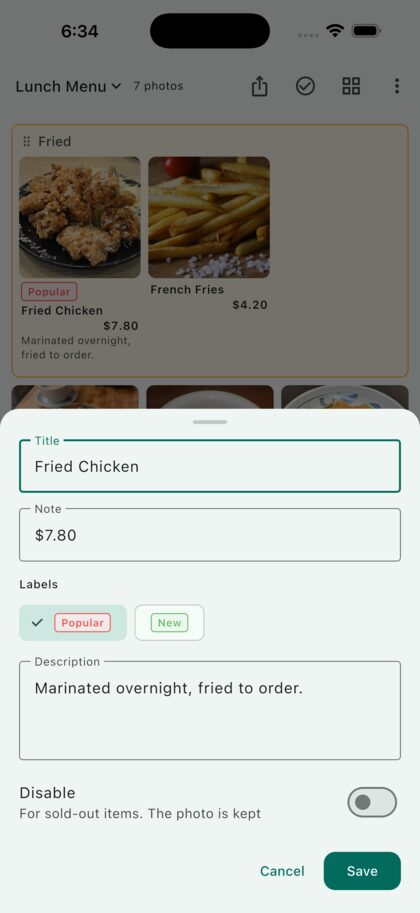
Tap a photo to write a title, a note and a description. Put the price in the note field — it sits right under the photo, short and readable. A one-line description is usually enough: "Marinated overnight, fried to order."
You can also attach labels such as "Popular" or "New". You name them yourself, so "Today only" or "Vegetarian" work just as well.
3. Group the courses
Photos that sit next to each other can be pulled into a named group — fried food, noodles, drinks. Each group gets its own frame, so a long menu stays readable.
4. Sold out? Don't delete it
Mark a dish as disabled and the photo and text turn grey with a line through the name. The photo stays, so tomorrow you just turn it back on. Nothing has to be rebuilt.
5. Hand it over as a PDF
The share button turns the board into a PDF laid out exactly as you see it. Print it, or send it by mail or messenger. The file isn't kept on the device — it only goes where you send it.
Questions
How many dishes fit?
There is no set limit; it is built to hold hundreds. For a real menu, switching between 2 and 5 columns to get a readable size matters more.
Do I rebuild it when a price changes?
No. Tap the dish and edit the number in the note field. The photo stays where it is.
Can I print it?
Yes. Make the PDF, then choose print from your device's share sheet. It is laid out on A4.
Is it free?
Yes. You get two folders. A one-time Premium purchase lifts the folder limit. On Android, the free version also shows one banner ad, which Premium removes. It is not a subscription.
Does it work for anything else?
The same screen records construction steps or hand-over notes. The shape is the same: shoot it, arrange it, say a word about it, hand it over. There are examples in the guide.