 EffortlessShot
Make a photo house manual
Published 2026-08-23 · Updated 2026-09-15
The same question keeps arriving because the answer is only words. "Under the sink" doesn't help when there are three doors. Photograph the door, add one line, and the messages stop.
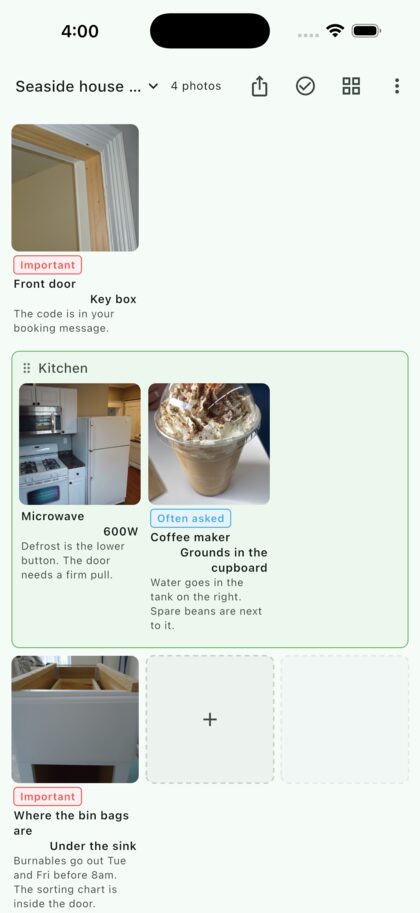
Why photos work here
Your guests don't know your house's vocabulary. "The shelf in the utility room" only means something to the person who lives there. A photo points at the thing itself, and needs no translation.
- It works for guests you don't share a language with
- The 11pm "how do I get on the wi-fi" message stops arriving
- Nothing has to be explained in person, so self check-in works
- The same thing doubles as instructions for your cleaner
Step by step
1. Photograph the places guests get stuck
Don't try to document the whole house. The places you have already been asked about are enough — the key box, the wi-fi, the bin bags, the aircon remote, the shower control. Those five cover most of it.
2. Write the answer in one line
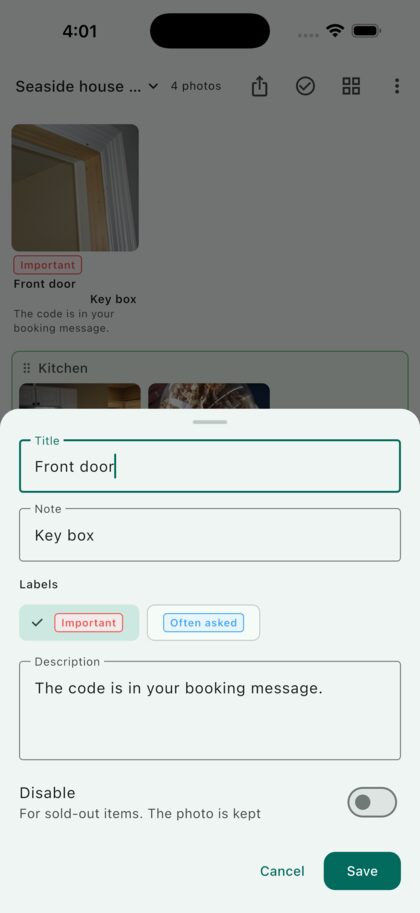
Put the place in the title and the answer itself in the note: "Under the sink", "600W", "Key box". Short lines get read. Add one line of description only where people trip up — "the door needs a firm pull".
Labels like "Important" or "Often asked" can be attached, so the few things guests must not skip stand out.
3. Use a screenshot for the wi-fi
Wi-fi is hard to photograph, but screenshots go in the same grid. Connect once, screenshot the settings screen, and the network name is shown exactly as it will look. A photo of the label on the router works too.
4. Group it by room
Consecutive photos can be pulled into a named group — kitchen, bathroom, bedroom. Each group gets a frame, so a guest reads only the room they're standing in.
5. Print it, or send it before check-in
The share button lays it out as a PDF exactly as you see it. Print it for the living room, or message it before arrival. Guests don't need the app.
6. When something is replaced, fix that one photo
New microwave? Retake that photo only. Anything no longer in use can be disabled — greyed out with a line through the name, kept rather than deleted, ready to switch back on.
Questions
What if I have several properties?
Use a folder per property. Two are free; a one-time Premium purchase lifts the limit.
Can I make a version in another language?
Make a second folder with the same photos and different text. The photos don't need retaking.
Can I use it for the cleaner's checklist?
Yes — that's the same shape as work instructions. Keep it in its own folder so it doesn't mix with the guest guide.
Do photos of my property leave the phone?
They are stored on your device. They go only where you send the PDF.
Is it free?
Yes. Two folders. Premium lifts the folder limit. On Android, the free version also shows one banner ad, which Premium removes. It is not a subscription.