 EffortlessShot
Make a photo catalogue of your work
Published 2026-08-23 · Updated 2026-09-15
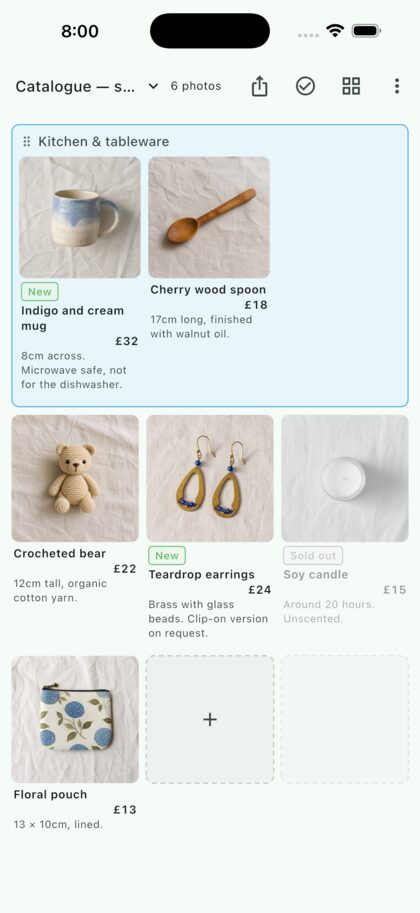
Photograph what you have made, put it in order, add a name and a price. Not enough to justify opening a shop, but you still want to show what exists right now. What that needs is a list, not a website.
When a list is what you need
- Before a market or a fair, showing regulars what you are bringing
- Before listing on a resale app, seeing what you actually have
- Salon or nail work, shown with a price and how long it takes
- Made-to-order pieces, including the colour and size variants
- Simply keeping a record of what you made, in the order you made it
What these share is that you know who is looking. Selling to strangers needs a shop; showing people you already know needs a list — quicker to make, and with no fees taken out.
Step by step
1. Shoot in the same place, in the same light
Tapping an empty slot opens the camera and the photo lands in that slot. For a catalogue, fixing where you shoot does more than anything else. The same cloth, the same window, and the pieces line up as a set. Photos taken against different backgrounds can't be reconciled afterwards.
2. Name it, price it, size it
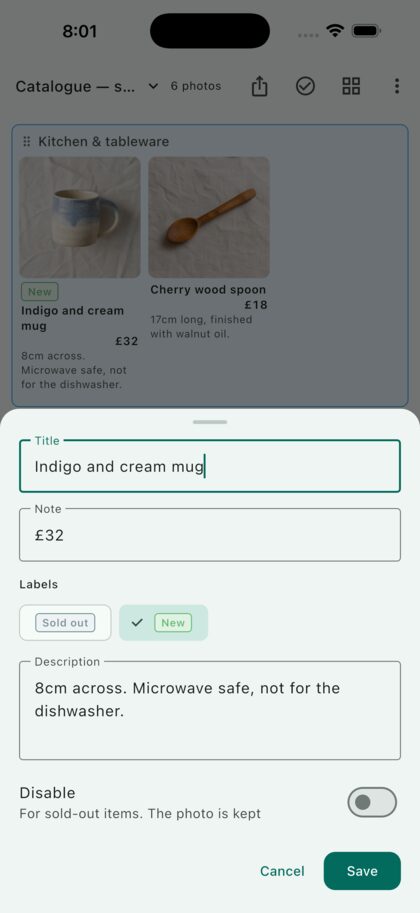
Put the name in the title and the price in the note — it sits right under the photo. Use the description for size and care: "8cm across. Microwave safe, not for the dishwasher."
The first thing a buyer wants is the size, and a photo can't tell them. Writing it down removes one round of messages.
3. Sold out? Grey it out, don't delete it
Marking a piece disabled greys out the photo and the text and strikes through the name. Nothing is lost, so it comes back when you make another. The evidence that you make this kind of thing stays visible — which is usually what brings the next order.
4. Group it by kind
Consecutive pieces can go into a named group — tableware, jewellery, textiles. Each group gets a frame, so a growing catalogue stays navigable.
5. Hand it over as a PDF
The share button lays it out as a PDF exactly as you see it. Send it to regulars before a fair, or print it and stand it beside the stall. They don't need the app.
Questions
Does this replace an online shop?
No. It handles no payments and no shipping. It covers the showing, and nothing else. Orders can keep arriving however they already do.
Do I rebuild it when a price changes?
No. Tap the piece and edit the number in the note. The photo stays put.
Can I keep a catalogue per season?
Use a folder each. Two are free; a one-time Premium purchase lifts the limit.
Does it work for salon work?
Yes — the finished look, with a price and a duration. It is the same build as a photo menu.
Is it free?
Yes. Two folders. Premium lifts the limit. On Android, the free version also shows one banner ad, which Premium removes. It is not a subscription.